


AI as Your Project Management Assistant: A Practical Guide for 2025
AI as Your Project Management Assistant: A Practical Guide for 2025
The project management landscape is undergoing a fundamental shift. According to KPMG research, companies investing in AI report achieving, on average, 15% productivity improvements for the projects they undertake. Meanwhile, Deloitte’s Q4 2024 report reveals that 74% of organizations report their GenAI initiatives are meeting or exceeding ROI expectations.
These aren’t just statistics—they represent a real transformation in how project managers work. The most successful project managers aren’t using AI to replace their judgment; they’re using it as a capable assistant that handles repetitive tasks, surfaces insights from data, and frees them to focus on what humans do best: leading teams, building relationships, and solving complex problems.
But here’s the reality that many articles won’t tell you: AI adoption in project management is also challenging. Capterra’s 2025 Project Management Software Trends Survey found that 41% of responding project managers said AI adoption is a challenge, while 39% reported a lack of AI skills on staff. The gap between AI’s promise and practical implementation is where most project managers find themselves today.
This comprehensive guide bridges that gap. Drawing from real-world experiences, research studies, and practical frameworks, we’ll explore how to effectively use AI as your project management assistant—including what works, what doesn’t, and how to avoid the common pitfalls that derail AI adoption efforts.
Understanding AI as a Project Management Assistant
What Does “AI Assistant” Actually Mean?
When we talk about AI as a project management assistant, we’re not describing a single technology or tool. Instead, we’re referring to a spectrum of AI capabilities that can support project managers across different aspects of their work.
AI assistants in project management typically fall into several categories:
-
Conversational AI Assistants: Chatbot-style interfaces that answer questions, provide recommendations, and help with decision-making. Examples include PMI Infinity, an AI-powered project coach grounded in global PM standards.
-
Embedded AI Features: AI capabilities built into existing project management tools like ClickUp Brain, Notion AI, or Asana Intelligence. These provide context-aware assistance within your existing workflows.
-
Automation-Focused AI: Systems that automatically handle repetitive tasks like status report generation, meeting scheduling, or progress tracking without constant human input.
-
Predictive Analytics AI: Machine learning systems that analyze project data to forecast risks, predict delays, and recommend resource allocations.
The key insight is that AI assistance isn’t monolithic. As Atlassian explains, “AI for project management is changing how almost everyone works” by automating tasks, processing information into actionable insights, and providing real-time monitoring and recommendations.
The Co-Pilot Model: AI Augments, Not Replaces
Before diving into specific capabilities, it’s essential to establish the right mental model. The most successful AI implementations treat the technology as a co-pilot, not a replacement for human project managers.
Research from The Digital Project Manager puts it clearly: “The biggest barrier isn’t technical, it’s cultural. Many PMOs still see AI as experimental or threatening. The real change comes when teams view AI as a co-pilot for visibility, not a replacement for judgment.”
This co-pilot model means:
- AI handles data-intensive tasks: Aggregating status updates, analyzing patterns, generating reports
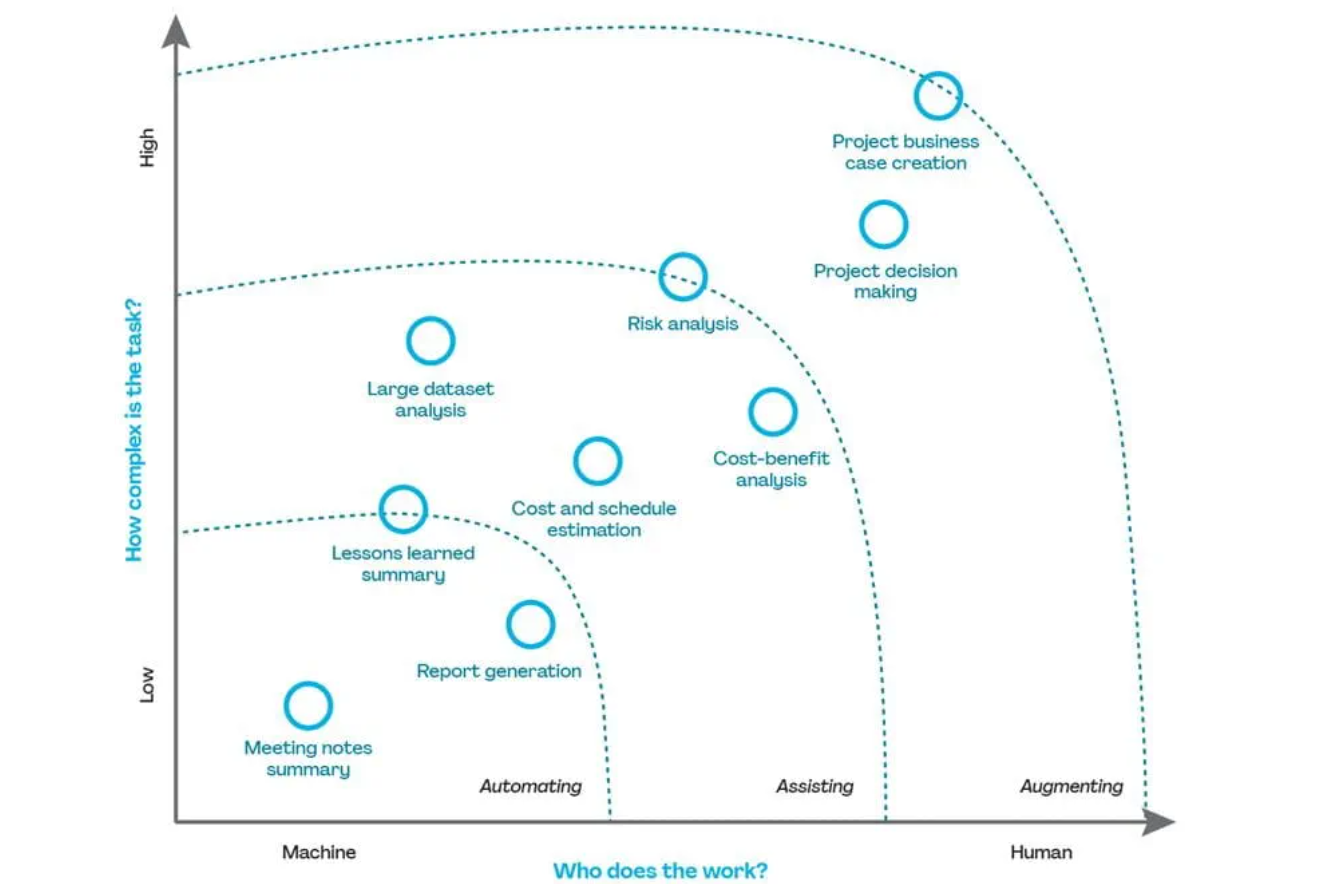
- Humans handle judgment-intensive tasks: Stakeholder negotiations, team motivation, ethical decisions
- Both collaborate on complex problems: AI provides analysis and options; humans make final decisions
Understanding this division of labor is crucial for successful AI adoption. When organizations try to fully automate project management decisions, they often encounter resistance and poor outcomes. When they position AI as an assistant that makes project managers more effective, adoption and satisfaction increase dramatically.
What AI Can Actually Do for Project Managers
Let’s move beyond the hype and examine the concrete capabilities that AI assistants offer project managers today. These aren’t theoretical possibilities—they’re features available in current tools and being used by project management teams worldwide.
Task Automation: Eliminating Administrative Overhead
Perhaps the most immediately valuable AI capability is automating the repetitive administrative tasks that consume project managers’ time. According to research, AI can automate important task management processes such as progress tracking, scheduling, and status updates.
Specific automation capabilities include:
Smart Task Generation and Assignment AI can automatically generate tasks from project briefs, requirements documents, or meeting notes. More advanced systems go further—analyzing team members’ skills, current workload, and historical performance to suggest optimal task assignments.
For example, when you upload a project brief, AI can:
- Extract action items and create corresponding tasks
- Identify dependencies between tasks
- Suggest deadlines based on historical project data
- Recommend team member assignments based on expertise and availability
Automated Status Reporting One of the most time-consuming aspects of project management is compiling status reports. AI assistants can:
- Aggregate progress updates from multiple sources (task boards, time tracking, communications)
- Identify blockers and at-risk items automatically
- Generate executive summaries in consistent formats
- Highlight changes since the last report
As one project manager noted, AI eliminates “the need to spend hours combing through data” by prompting the system to analyze project files and provide contextual answers.
Meeting Management AI dramatically improves meeting efficiency through:
- Automatic transcription of discussions
- Extraction of action items and decisions
- Summary generation highlighting key points
- Follow-up task creation from meeting outcomes
Confluence’s AI capabilities, for example, can help teams create project plans, briefs, and lists of action items while automatically summarizing meeting notes and status updates.
Intelligent Analysis: Seeing What Humans Miss
Beyond automation, AI provides analytical capabilities that help project managers make better decisions by processing more information than humans can handle manually.
Risk Prediction and Early Warning
AI excels at pattern recognition across large datasets. By analyzing historical project data, AI systems can identify correlations between specific factors and project outcomes that humans might miss.
Wrike’s AI analyzes detailed task data and activity to spot early warning signs, updating each project’s risk score dynamically. When that score increases, the system sends alerts and suggests fixes.
This predictive capability manifests in several ways:
- Schedule Risk Detection: AI identifies when current progress rates make deadline achievement unlikely
- Resource Constraint Warnings: Analysis of workload patterns reveals when team burnout risks are emerging
- Dependency Risk Identification: AI flags when delays in one area are likely to cascade through the project
- External Factor Analysis: Some systems incorporate market data, supply chain information, or other external variables
Resource Optimization
AI-assisted resource allocation uses sophisticated algorithms to solve one of project management’s most complex challenges: matching the right people to the right tasks at the right time.
AI provides resource optimization through:
- Skill-Based Matching: Evaluating team members’ expertise, certifications, and past performance for optimal assignments
- Workload Balancing: Identifying when team members are approaching overload and suggesting redistributions
- Capacity Planning: Forecasting future resource needs based on project pipeline and historical patterns
- What-If Analysis: Modeling the impact of different resource allocation scenarios
Performance Analytics
AI can analyze project performance data to surface insights about:
- Which types of tasks typically take longer than estimated
- Which team configurations produce the best results
- What project phases experience the most variability
- Which risk factors most commonly lead to problems
These insights enable project managers to improve their estimation accuracy, team composition decisions, and risk management approaches over time.
Communication and Documentation Support
AI significantly enhances project communication and documentation, areas that often consume substantial project manager time.
Intelligent Communication Assistance
AI helps with project communications through:
- Stakeholder Update Generation: Creating appropriate updates for different audiences (executives, team members, clients) from the same source data
- Tone and Clarity Optimization: Reviewing communications for clarity and suggesting improvements
- Translation and Localization: Supporting global teams by facilitating cross-language communication
- Response Drafting: Generating initial drafts for common questions or requests
Documentation Generation
Creating and maintaining project documentation is another area where AI provides substantial assistance:
- Project Charter Drafts: Generating initial project documentation from requirements and discussions
- Process Documentation: Creating standard operating procedures from observed workflows
- Lessons Learned Compilation: Aggregating insights from retrospectives and project closeouts
- Knowledge Base Maintenance: Keeping documentation current as projects evolve
Decision Support and Recommendations
Perhaps the most sophisticated AI capability is providing decision support through data analysis and recommendations.
Scenario Analysis AI can model different scenarios to help project managers understand potential outcomes:
- What happens if we add resources to the critical path?
- How does a scope change affect our timeline and budget?
- Which risks should we prioritize mitigating?
- What’s the optimal sequence for remaining deliverables?
Recommendation Engines Based on analysis of current project state and historical patterns, AI can recommend:
- Which tasks to prioritize
- When to escalate issues
- How to allocate unexpected budget
- Which team members to involve in specific decisions
The key is that AI provides recommendations with supporting rationale, enabling project managers to make informed decisions rather than blindly following suggestions.
Real Project Manager Experiences: Lessons from the Field
Understanding AI capabilities in theory is one thing. Understanding how project managers actually experience using AI assistants is another. Let’s examine what practitioners are discovering—the successes, challenges, and unexpected lessons.
The Adoption Reality Check
Despite the compelling potential, AI adoption in project management faces significant challenges. Capterra’s 2025 survey revealed sobering statistics:
- 41% of project managers said AI adoption is a challenge
- 39% reported a lack of AI skills on staff
- 36% said integrating new tools into existing workflows is a significant hurdle
These numbers reflect a gap between AI’s potential and current implementation reality. Understanding why helps project managers navigate the adoption journey more effectively.
In online communities where project managers discuss their experiences, the sentiment is often mixed. One IT project manager shared their honest assessment: “I only use internal AI tools, or those that have been ‘blessed’ by my company. I haven’t found it to be super helpful in spreadsheets or project trackers yet, but it really is starting to nail comms creation and summary one-pagers. Saves hours of time.”
Another project manager who tested AI with work breakdown structures offered a sobering perspective: “I have uploaded various WBS in MSProject format and ChatGPT is okay at analyzing the plan but isn’t better than the tools already in project or my brain. You could spend hours on prompting it, but as of now, it will take less time to just create your own plans and manage the project.”
The takeaway? AI tools are evolving rapidly, and their usefulness varies significantly by use case. What works brilliantly for one task may be underwhelming for another.
Trust: The Defining Challenge
Research consistently shows that trust is the defining challenge for AI adoption in project management. The concerns aren’t irrational—they stem from real limitations and risks.
Why Trust Is Difficult
-
Hallucinations: AI systems can confidently present incorrect information. In project management contexts, acting on false data can have serious consequences.
-
Opacity: Many AI systems don’t explain their reasoning. When AI recommends a course of action, project managers may not understand why, making it difficult to evaluate the suggestion.
-
Context Limitations: AI may not fully understand project nuances, organizational politics, or stakeholder relationships that inform decisions.
-
Accountability Questions: When AI-assisted decisions go wrong, questions about responsibility become complicated.
-
Security and IP Concerns: Perhaps the most visceral concern comes from project managers in regulated industries. As one cybersecurity PM put it bluntly: “The story of uploading company’s IP (project artifacts) to an unsanctioned AI scares the sh*t out of me.” This isn’t paranoia—it’s professional awareness. Many organizations have strict policies about what data can leave company systems, and AI tools often process data in external cloud environments.
Building Trust Gradually
Successful AI adoption addresses trust through:
- Starting with low-stakes decisions where errors have limited impact
- Requiring human review of AI recommendations before action
- Making AI reasoning transparent where possible
- Tracking AI recommendation accuracy over time
- Creating feedback loops to improve AI performance
As one experienced project manager explained: “Trust must be built not just through results but through governance, accountability, and clear human oversight.”
The Training Challenge
Learning to use AI effectively takes time and effort. Real feedback from project managers reveals the training challenge:
“Some project managers do not want to relinquish control…Training is a pain, too. It took half the team three weeks to get comfortable with ClickUp’s AI feature.”
Key Training Insights:
-
Skills Gap Is Universal: Everyone is at a different point in their AI journey. Some team members are just getting started; others are more advanced. This creates adoption challenges.
-
Learning Curve Varies: The AI skill half-life is approximately 3-4 months, meaning continuous learning is required as capabilities evolve.
-
Practical Application Matters: Training should emphasize hands-on practice in real project contexts, not just feature demonstrations.
-
Champion Model Works: Organizations succeed when they identify and empower AI champions who can mentor others through adoption.
What AI Does Well: Success Stories
Despite the challenges, project managers report significant benefits when AI is implemented effectively.
Time Savings on Administrative Tasks
The most commonly reported benefit is time savings on routine administrative work. Project managers report that AI assistance with:
- Status report generation reduces reporting time by 50-70%
- Meeting note summarization eliminates hours of manual work
- Task creation from documents accelerates project setup significantly
One experienced project manager in an industrial setting shared their team’s daily use cases, none of which involve high-risk intellectual property:
- Debugging macros in Excel
- Writing complex formulae in Excel
- Proposing key topics for staff assessment discussions
- Writing the scope of work for subcontractors
- Finetuning text in emails
- Drafting SOPs for operations (note: drafting only—the specifics that are the real IP come from human experts)
- Reviewing documents for inconsistencies and gaps
“I’m using it daily,” they noted, “and so are a lot of my colleagues.” The key insight: focus AI on tasks where the risk of exposing sensitive IP is low, but the time savings are significant.
Improved Decision Quality
Project managers using AI for analytics report better-informed decisions:
- Earlier detection of at-risk projects enables proactive intervention
- Resource optimization suggestions reduce bottlenecks
- Risk pattern identification improves planning accuracy
Consistency and Completeness
AI helps ensure nothing falls through the cracks:
- Automated reminders and follow-ups improve completion rates
- Systematic checking identifies gaps in documentation
- Standardized processes reduce variability
What AI Struggles With: Known Limitations
Equally important is understanding where AI assistance falls short.
Complex Stakeholder Dynamics
AI cannot effectively navigate:
- Political sensitivities within organizations
- Personality conflicts between team members
- Negotiation with difficult stakeholders
- Building trust and rapport
Creative Problem-Solving
When novel situations arise, AI limitations become apparent:
- Unprecedented challenges require human creativity
- Innovation requires thinking beyond historical patterns
- Adaptive leadership cannot be automated
Ethical Judgment
Decisions with ethical dimensions require human involvement:
- Trade-offs between competing values
- Fairness considerations in resource allocation
- Privacy and confidentiality decisions
- Cultural sensitivity in global projects
Context Understanding
Despite advances, AI still struggles with:
- Implicit organizational knowledge
- Unwritten rules and norms
- Historical context and relationships
- Subtle communication cues
Unexpected Lessons from Early Adopters
Project managers who have been using AI assistants share some unexpected insights:
1. AI Requires More Structure, Not Less
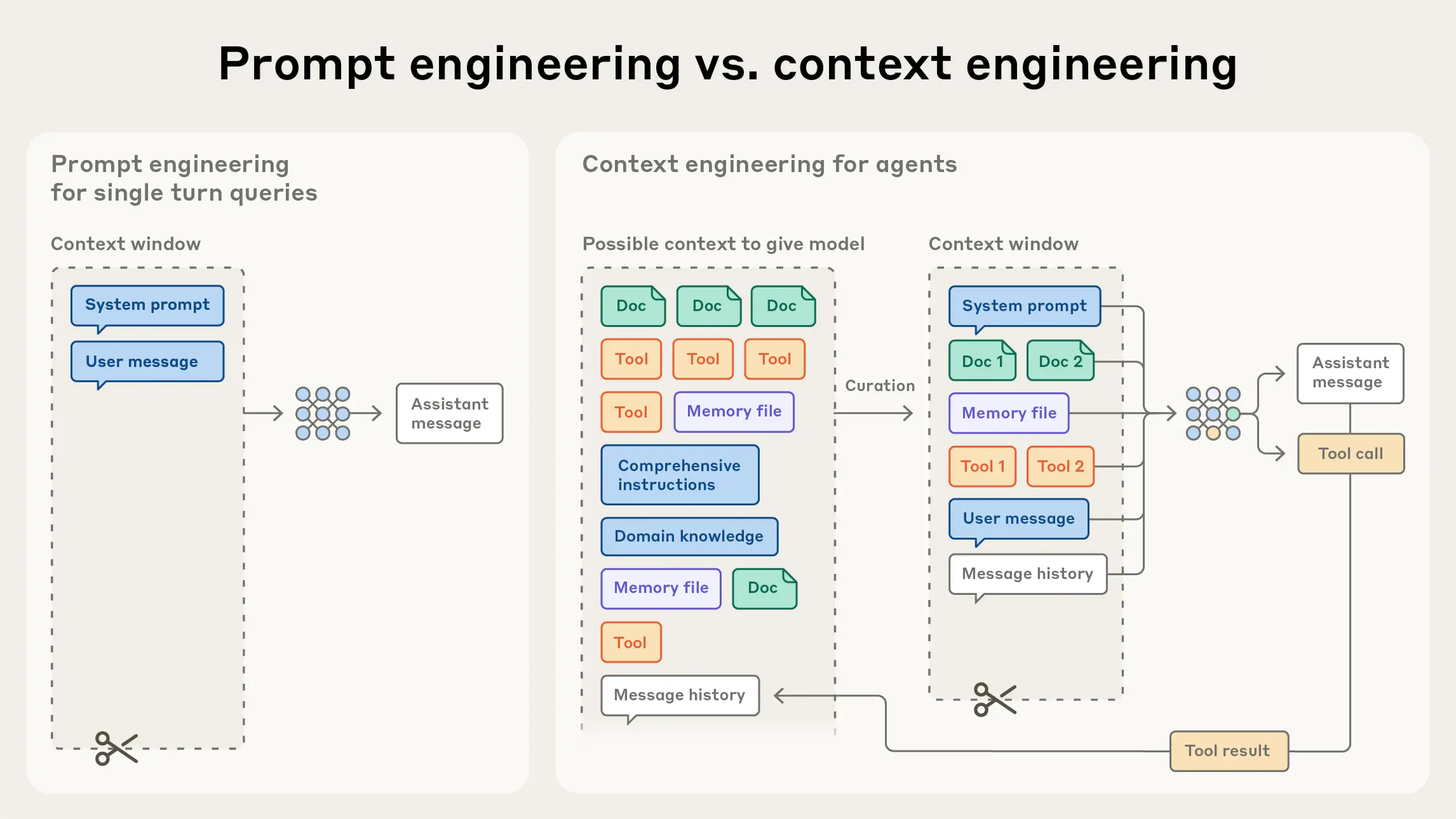
Contrary to expectations that AI would handle ambiguity, many project managers find that AI works best with well-structured inputs. Clear task definitions, explicit requirements, and standardized processes enable AI to be more helpful.
2. Human Skills Become More Important
Rather than diminishing the need for soft skills, AI adoption makes them more critical. With AI handling routine tasks, project managers’ value increasingly depends on leadership, communication, and relationship-building abilities.
3. Change Management Is the Real Challenge
Technical implementation is often easier than organizational adoption. Success requires:
- Clear communication about AI’s role and limitations
- Addressing team concerns about job security
- Building new workflows that incorporate AI effectively
- Creating culture that embraces AI as a tool, not a threat
4. Perfect Is the Enemy of Good
Waiting for AI to be “fully mature” means missing opportunities. Project managers who start experimenting now, even imperfectly, build valuable skills and insights. As one PM noted: “The current AI tools are not ready for project management yet but that could literally change overnight.” Those who build AI fluency now will be ready when tools mature.
5. The Context Problem Is Real
Many project managers struggle with a fundamental limitation: AI assistants often lack persistent context. As one frustrated user explained: “My problem with ChatGPT is, I have to keep giving it context and keep uploading files. And definitely has no access to the likes of Trello or Jira.”
This context problem is why embedded AI features within existing project management platforms often outperform standalone AI tools—they already have access to your project data.
6. Integration Matters More Than Features
GenAI tools generally can’t integrate with other systems on their own—you need third-party tools like Zapier to create connections. The exception is when you’re already in an ecosystem. MS Copilot can connect with MS tools without additional integration, and Atlassian Intelligence can work across Jira and Confluence seamlessly.
The lesson: before evaluating AI features, consider how the tool fits into your existing workflow. A slightly less powerful AI that integrates well often delivers more value than a more sophisticated AI that operates in isolation.
A Practical Framework for Getting Started
Based on successful implementation patterns, here’s a structured framework for incorporating AI assistance into your project management practice.
Phase 1: Assessment and Preparation
Step 1: Audit Your Current Pain Points
Before exploring AI tools, clearly identify where you need help:
- What tasks consume disproportionate time?
- Where do errors or oversights commonly occur?
- What information do you wish you had but can’t easily compile?
- Which decisions would benefit from better data analysis?
Create a prioritized list of problems worth solving. This focus prevents the common mistake of adopting AI broadly without clear objectives.
Step 2: Evaluate Your Data Readiness
AI effectiveness depends heavily on data quality. Assess:
- Are your project management systems well-populated with data?
- Is data entry consistent across team members?
- Do you have historical project data for pattern analysis?
- Are your systems integrated or siloed?
If data quality is poor, improving it should precede AI adoption. AI cannot provide good insights from bad data.
Step 3: Understand Your Constraints
Be realistic about implementation constraints:
- Budget for tools and training
- Team capacity for adoption activities
- Organizational appetite for change
- Security and compliance requirements
These constraints shape which AI approaches are feasible.
Phase 2: Tool Selection and Initial Implementation
Step 4: Start with Embedded AI Features
Rather than adding new tools, explore AI capabilities in your existing project management platform. Most major platforms now include AI features:
- If you use ClickUp, explore ClickUp Brain
- If you use Notion, explore Notion AI
- If you use Asana, explore Asana Intelligence
- If you use Monday.com, explore their AI capabilities
Starting with familiar platforms reduces the learning curve and integration challenges.
Step 5: Choose One Use Case to Start
Resist the temptation to use AI for everything immediately. Select a single, well-defined use case that:
- Addresses a real pain point from your assessment
- Has low risk if AI makes errors
- Provides clear, measurable benefits
- Can demonstrate value quickly
Good starting use cases include:
- Meeting note summarization
- Status report drafting
- Task extraction from documents
- Simple workflow automation
Step 6: Define Success Criteria
Before implementation, establish how you’ll evaluate success:
- What metrics will improve? (Time saved, accuracy, completeness)
- What’s the minimum improvement needed to justify continued use?
- How will you gather feedback from users?
- What timeline allows for fair evaluation?
Phase 3: Implementation and Learning
Step 7: Start Small, Learn Fast
Begin with a pilot:
- Apply AI to selected use case on a single project
- Involve a small group of willing early adopters
- Create space for experimentation and learning
- Document what works and what doesn’t
Step 8: Validate AI Outputs
Never trust AI blindly, especially initially:
- Review AI-generated content before distribution
- Cross-check AI analysis against other sources
- Track instances where AI is wrong
- Use errors as learning opportunities
As experts recommend: “AI-generated results should never be accepted without checking them; validate results with your own expertise.”
Step 9: Gather and Incorporate Feedback
Structured feedback improves both AI effectiveness and adoption:
- Regular check-ins with users about AI experience
- Tracking of specific successes and failures
- Adjustment of prompts, settings, or workflows based on learning
- Sharing of best practices across the team
Step 10: Iterate and Expand
Based on pilot results:
- Refine the initial use case based on learning
- Expand to additional users once the approach is proven
- Add additional use cases one at a time
- Build organizational capability systematically
Phase 4: Scaling and Optimization
Step 11: Develop Internal Expertise
As AI use expands, build internal capabilities:
- Identify and develop AI champions
- Create documentation of best practices
- Establish training programs for new users
- Build community for sharing learnings
Step 12: Establish Governance
As AI becomes more embedded, governance becomes important:
- Clear policies on AI use and limitations
- Decision rights for AI-assisted vs. human-only decisions
- Data privacy and security protocols
- Accountability frameworks
Step 13: Measure and Communicate Value
Ongoing demonstration of value sustains adoption:
- Track metrics that matter to stakeholders
- Communicate successes widely
- Be transparent about limitations and learning
- Build case for continued investment
Popular AI Tools for Project Managers in 2025
The AI tool landscape is vast and rapidly evolving. Here’s an overview of leading options with their specific strengths for project management use cases.
Comprehensive Project Management Platforms with AI
ClickUp Brain
ClickUp’s AI assistant integrates deeply into their project management platform:
- Strengths: Extensive customization, productivity optimization, good task management automation
- Best For: Teams already using ClickUp who want AI without additional tools
- AI Capabilities: Task generation, writing assistance, progress summarization, automation suggestions
Users report that ClickUp’s AI features have a learning curve, but provide significant value once mastered.
Asana Intelligence
Asana’s AI features focus on strategic alignment:
- Strengths: Strategic initiative support, goal alignment, workflow optimization
- Best For: Organizations emphasizing strategic planning and portfolio management
- AI Capabilities: Smart status updates, workflow recommendations, goal tracking insights
Monday.com AI
Monday.com offers AI focused on resource planning and risk:
- Strengths: Resource optimization, risk assessment, versatile for various team types
- Best For: Teams of all sizes needing flexible AI assistance
- AI Capabilities: Predictive analytics, resource recommendations, automation building
Wrike AI
Wrike emphasizes workflow automation and risk detection:
- Strengths: Sophisticated workflow management, dynamic risk scoring, detailed analytics
- Best For: Complex projects requiring advanced automation
- AI Capabilities: Risk analysis, workflow optimization, predictive insights
Collaboration and Documentation Tools with AI
An AI-first workspace designed to transform rough requirements into complete project documentation:
- Strengths: AI-powered document creation from requirements, context-aware chat assistant, real-time team collaboration, markdown-based with full audit trail
- Best For: Teams who need to quickly transform scattered requirements into structured project plans, epics, and task documentation
- AI Capabilities: One-click actions to create epics from requirements, intelligent file analysis to surface risks, contextual AI assistant that understands your entire project
The platform’s five-step workflow (Input → Discovery → Direction → Reuse → Output) maintains context throughout, eliminating the need to rebuild information across multiple tools. Early adopters report up to 40% productivity improvements.
Notion AI
Notion’s AI integrates with its flexible workspace:
- Strengths: Excellent for documentation, meeting notes, project wikis
- Best For: Teams using Notion for knowledge management and planning
- AI Capabilities: Content generation, summarization, Q&A on project documentation
As one reviewer noted: “Notion AI makes getting answers super easy via its chatbot. Instead of spending hours combing through data, you can just prompt Notion AI to go through your project files and give you contextual answers.”
Confluence AI
Atlassian’s Confluence includes AI for team documentation:
- Strengths: Integration with Jira, strong for technical documentation
- Best For: Software development teams using Atlassian ecosystem
- AI Capabilities: Project plan creation, meeting summarization, action item tracking, stakeholder notifications
Specialized AI Assistants
PMI Infinity
The Project Management Institute’s AI-powered coach:
- Strengths: Grounded in PMI standards and best practices, educational focus
- Best For: Project managers wanting guidance aligned with professional standards
- AI Capabilities: Project coaching, methodology guidance, best practice recommendations
Height
A newer entrant with strong AI integration:
- Strengths: Good in-task chat system, decent Kanban view, AI copilot for summarizing
- Best For: Teams seeking a modern, AI-native project management experience
- AI Capabilities: Task summarization, conversation analysis, workflow assistance
Atlassian Rovo
Atlassian’s newest AI acquisition, integrated with their intelligence platform:
- Strengths: Deep integration with Jira/Confluence ecosystem, AI “companions” that work within your existing tools
- Best For: Teams already using Atlassian products who want AI that understands their existing data
- AI Capabilities: Search across all Atlassian products, contextual AI assistance, automated workflows
One enthusiastic early adopter described Rovo as “essentially the concept of ChatGPT ‘companions’ but within Jira/Confluence.” The ecosystem advantage means Rovo has context that standalone AI tools lack.
Korey.ai
A newer AI platform gaining traction in project management communities:
- Strengths: Integration with Shortcut and other modern development tools
- Best For: Teams using Shortcut for agile project management
- AI Capabilities: Task automation, workflow optimization, reduced manual work
Teams using Korey.ai in conjunction with Shortcut report it has “saved a ton of time, reduced manual work” compared to standalone AI assistants.
Microsoft Copilot
Microsoft’s AI assistant integrated across the Microsoft 365 suite:
- Strengths: Native integration with Word, Excel, PowerPoint, Teams, and Project; no additional integration tools needed for MS ecosystem
- Best For: Organizations heavily invested in Microsoft tools
- AI Capabilities: Document drafting, data analysis in Excel, meeting summaries in Teams, project insights
Google Gemini
Google’s AI assistant for Workspace users:
- Strengths: Integration with Google Workspace (Docs, Sheets, Meet), strong natural language understanding
- Best For: Google Workspace shops seeking AI assistance
- AI Capabilities: Content generation, email drafting, meeting notes, spreadsheet analysis
UiPath Autopilot
An AI assistant focused on process automation:
- Strengths: Powerful automation capabilities, can connect disparate systems
- Best For: Organizations looking to automate complex, cross-system workflows
- AI Capabilities: Process discovery, workflow automation, integration across tools
Choosing the Right Tool
When selecting an AI tool for project management, consider:
1. Integration with Existing Systems
- Does it connect with your current tools (Jira, Slack, etc.)?
- How much data migration is required?
- Can it access historical project data?
2. Specific AI Capabilities
- Which AI features address your priority use cases?
- How mature are the AI capabilities you need most?
- What’s the roadmap for future AI development?
3. Team Fit
- How steep is the learning curve?
- Does the interface match your team’s preferences?
- What training and support are available?
4. Cost and ROI
- What’s the total cost including training and transition?
- What time savings can you realistically expect?
- How does pricing scale as your team grows?
5. Security and Compliance
- Where is data stored and processed?
- What compliance certifications does the vendor have?
- How is AI model training handled regarding your data?
Security and Data Privacy: The Elephant in the Room
Before diving into common pitfalls, we need to address what many project managers consider the most critical concern: security and intellectual property protection.
The Risk Is Real
For project managers in regulated industries or companies with sensitive IP, the concern about AI tools isn’t theoretical. One cybersecurity PM’s reaction to the idea of uploading project artifacts to AI tools was visceral: “The story of uploading company’s IP to an unsanctioned AI scares the sh*t out of me.”
This concern is well-founded. When you upload documents to cloud-based AI tools, you’re potentially:
- Sending proprietary information to external servers
- Creating training data that might influence future AI outputs
- Violating data protection regulations (GDPR, HIPAA, etc.)
- Breaking contractual obligations about data handling
Navigating AI Safely
Use Only Sanctioned Tools
The safest approach is using only AI tools approved by your organization’s IT and security teams. As one IT project manager put it: “I only use internal AI tools, or those that have been ‘blessed’ by my company.”
This might seem restrictive, but it’s also practical. If the tool isn’t approved, using it could be grounds for disciplinary action—regardless of how useful it might be.
Understand Where Data Goes
Not all AI tools handle data the same way:
- Some process data entirely on your device (local AI)
- Some send data to cloud servers but don’t retain it
- Some use your data to train models (opt-out may be possible)
- Some provide enterprise agreements with strict data handling provisions
Before using any AI tool with project data, understand its data handling policies.
On-Premise Solutions
For organizations with strict security requirements, on-premise AI solutions are becoming more available. As one technical PM noted: “You can use onsite AI software but it sometimes will send requests to external AI which then exposes some of your IP. So the AI model must reside onsite which kinda limits its power and pushes up prices as it will often end up as a custom installation.”
The trade-off is real: on-premise AI is more secure but typically less capable and more expensive than cloud solutions.
Low-Risk Use Cases First
A practical approach is to identify use cases that don’t involve sensitive data:
- Drafting generic templates (not containing project specifics)
- Writing communications that don’t include proprietary information
- Creating general frameworks and checklists
- Practicing with anonymized or synthetic data
One industrial PM shared how their team uses AI “daily” for tasks like debugging Excel macros, drafting SOPs, and reviewing documents—none of which expose critical IP.
Risk Assessment Is Essential
Before implementing any AI tool, conduct a proper risk assessment:
- What data will the AI have access to?
- Where is data processed and stored?
- What are the vendor’s data retention policies?
- What compliance certifications does the vendor have?
- What happens if there’s a data breach?
If the answers aren’t satisfactory, the tool isn’t worth the risk—no matter how impressive its features.
Common Pitfalls and How to Avoid Them
AI adoption in project management frequently stumbles on predictable obstacles. Understanding these pitfalls enables proactive avoidance.
Pitfall 1: Tool Overload
The Problem
Project managers often juggle 5-8 systems, and adding AI tools can compound the complexity. Tool overload manifests as:
- Context switching between multiple platforms
- Inconsistent data across systems
- Integration challenges
- Training burden for multiple tools
The Solution
Prioritize consolidation over addition:
- Evaluate AI features in existing tools before adopting new ones
- If adding tools, retire or reduce use of others
- Prioritize platforms with strong integration capabilities
- Create clear guidelines about which tools to use for what
As one practitioner advised: “Tool overload is a real issue. It is best to stay current on trends and try to predict future leverage. Next, let the winners emerge in the market or be integrated directly into the existing tools we use. Then adopt the ones best suited for your needs.”
Pitfall 2: Blind Trust in AI Outputs
The Problem
AI can be confidently wrong. When project managers trust AI outputs without verification:
- Errors propagate into decisions and communications
- Stakeholder trust erodes when mistakes are discovered
- “Garbage in, garbage out” problems compound
The Solution
Establish verification practices:
- Always review AI-generated content before distribution
- Cross-check AI analysis against other data sources
- Be especially skeptical of surprising or high-stakes recommendations
- Create escalation paths for uncertain AI outputs
Remember: AI is an assistant, not an authority. Your professional judgment remains essential.
Pitfall 3: Ignoring Team Resistance
The Problem
Human factors are a primary challenge in 63% of AI implementations. Resistance manifests as:
- Passive non-adoption (not using available AI features)
- Active opposition (arguments against AI use)
- Workarounds (manual processes despite AI availability)
- Anxiety about job security
The Solution
Address resistance proactively:
- Communicate clearly about AI’s role as augmentation, not replacement
- Involve team members in tool selection and implementation
- Address job security concerns honestly
- Celebrate successes and share positive experiences
- Provide adequate training and support
Change management is as important as technical implementation.
Pitfall 4: Lack of Clear Use Cases
The Problem
The roadblock isn’t the model; it’s the lack of strategic direction. Without clear use cases:
- AI adoption lacks focus and direction
- Resources spread thin across unfocused efforts
- ROI is difficult to measure
- Teams become frustrated with unclear expectations
The Solution
Define specific, measurable use cases:
- Start with pain points, not technology
- Create clear success criteria for each use case
- Focus resources on priority opportunities
- Expand only after proving value
Pitfall 5: Expecting Immediate Perfection
The Problem
AI capabilities are impressive but imperfect. Expecting perfection leads to:
- Disappointment when AI makes errors
- Abandonment before learning occurs
- Unrealistic expectations that poison adoption
The Solution
Set realistic expectations:
- AI is a tool that improves with use
- Errors are learning opportunities
- Value comes from net improvement, not perfection
- Patience and iteration drive success
Pitfall 6: Neglecting Data Quality
The Problem
The effectiveness of AI hinges on the quality and quantity of data it processes. Poor data leads to:
- Inaccurate predictions and recommendations
- Misleading insights
- Eroded trust in AI outputs
The Solution
Invest in data quality:
- Standardize data entry practices
- Clean existing data before AI implementation
- Create accountability for data accuracy
- Monitor data quality ongoing
Pitfall 7: Underinvesting in Training
The Problem
22% of employees struggle with AI’s learning curve. Inadequate training results in:
- Underutilization of AI capabilities
- Frustration and resistance
- Poor outcomes from improper use
The Solution
Commit to comprehensive training:
- Provide initial training for all users
- Create resources for ongoing learning
- Develop internal experts who can support others
- Allow time for practice and experimentation
The Human Element: What AI Cannot Replace
As we consider what AI can do, it’s equally important to understand what requires distinctly human capabilities. This understanding shapes how project managers should evolve their practice.
Leadership and Vision
AI can analyze data and suggest options, but leadership requires:
- Setting Direction: Defining project vision and inspiring teams to achieve it
- Making Difficult Choices: Decisions involving trade-offs between competing values
- Accountability: Taking responsibility for outcomes in ways AI cannot
- Presence: Being available and engaged in ways that build team confidence
Stakeholder Relationship Management
Project success often depends on relationships that AI cannot build:
- Trust Building: Developing the personal trust that enables collaboration
- Negotiation: Finding solutions that satisfy competing interests
- Political Navigation: Understanding and working within organizational dynamics
- Conflict Resolution: Managing interpersonal tensions constructively
Team Motivation and Development
People respond to human connection in ways AI cannot replicate:
- Recognition: Meaningful acknowledgment of contributions
- Mentorship: Personal guidance in career and skill development
- Morale Management: Sensing and responding to team energy
- Culture Building: Creating environments where people thrive
Creative Problem-Solving
While AI excels at pattern-based solutions, novel challenges require:
- Innovation: Developing approaches that don’t exist in historical data
- Judgment in Ambiguity: Making decisions when information is incomplete
- Adaptation: Responding to unprecedented situations creatively
- Systems Thinking: Understanding complex interdependencies
Ethical Judgment
Decisions with ethical dimensions require human involvement:
- Fairness: Ensuring equitable treatment when AI might perpetuate biases
- Privacy: Protecting information that should remain confidential
- Transparency: Deciding what to share and with whom
- Values Alignment: Ensuring decisions align with organizational and personal values
The Evolving Project Manager Role
As AI handles more tactical execution, project managers’ roles will evolve toward:
Strategic Orchestration
- Focusing on outcomes rather than tasks
- Connecting project work to organizational strategy
- Optimizing portfolio-level decisions
Human-Centric Leadership
- Building high-performing teams
- Managing change and transformation
- Creating inclusive, effective work environments
AI Partnership Management
- Understanding AI capabilities and limitations
- Designing effective human-AI workflows
- Ensuring appropriate oversight of AI systems
Ethical Stewardship
- Ensuring responsible AI use
- Protecting against AI-related risks
- Advocating for human-centered approaches
Actionable Tips to Start Today
Here are concrete actions you can take immediately to begin benefiting from AI assistance in your project management practice.
Tip 1: Identify One Repetitive Task This Week
Look at your calendar and task list for this week. Identify one repetitive task that consumes significant time—status report compilation, meeting note organization, or task list updates. Research whether your existing tools have AI features that could help, or explore one new tool that addresses this specific need.
Tip 2: Experiment with AI Meeting Assistance
Your next team meeting is an opportunity to test AI assistance. Use tools like Otter.ai, Fireflies.ai, or built-in meeting transcription to:
- Record and transcribe the meeting
- Generate automated summaries
- Extract action items
Compare the AI output to what you would have captured manually. Note what works and what needs adjustment.
Tip 3: Use AI for First Drafts, Not Final Products
When you need to write project documentation, status updates, or stakeholder communications, use AI to generate first drafts. This could be as simple as:
- Asking ChatGPT to draft a project charter from your requirements
- Using Notion AI to summarize project notes
- Having Copilot draft email updates from bullet points
Review and refine the output, but let AI accelerate the starting point.
Tip 4: Create an AI Prompt Library
As you discover effective ways to use AI, document them:
- What prompts produce useful outputs?
- What context improves results?
- What follow-up questions refine initial responses?
Building this library accelerates your AI effectiveness and enables knowledge sharing with teammates.
Tip 5: Schedule Regular AI Learning Time
AI capabilities evolve rapidly. Schedule 30 minutes weekly to:
- Read about new AI features in your tools
- Watch tutorials on AI techniques
- Experiment with capabilities you haven’t tried
- Connect with others using AI in project management
Continuous learning prevents your skills from becoming outdated.
Tip 6: Establish Your Verification Habit
Before AI outputs reach stakeholders, build verification into your workflow:
- Always read AI-generated content thoroughly
- Cross-reference facts and figures
- Check that tone and context are appropriate
- Ensure nothing sensitive was included inappropriately
Make verification automatic, not optional.
Tip 7: Share Your Learnings with Your Team
AI adoption benefits from collective learning:
- Share what works in team meetings
- Discuss failures openly as learning opportunities
- Create shared resources for best practices
- Encourage experimentation and discussion
Building team capability multiplies individual AI benefits.
Tip 8: Start Tracking AI Impact
Begin measuring the impact of AI assistance:
- Time spent on tasks before and after AI
- Quality or completeness improvements
- Team feedback on AI-assisted processes
- Specific outcomes improved by AI insights
Data on AI impact supports continued investment and identifies improvement opportunities.
Looking Ahead: The Future of AI in Project Management
While this guide focuses on practical current applications, understanding the trajectory of AI in project management helps inform long-term planning.
Emerging Capabilities
Agentic AI Systems AI is evolving from assistants that respond to requests toward agents that can autonomously complete workflows. Future project management AI might:
- Monitor project health continuously
- Intervene proactively when problems emerge
- Coordinate routine communications automatically
- Execute standard processes without human initiation
Hyper-Personalization AI will increasingly adapt to individual preferences and working styles:
- Learning your communication preferences
- Adjusting recommendations based on your decision patterns
- Providing insights in formats you prefer
- Anticipating your information needs
Cross-Project Intelligence AI will identify patterns across entire project portfolios:
- Best practices emerging from successful projects
- Common risk patterns across the organization
- Resource optimization opportunities portfolio-wide
- Predictive insights from organizational learning
Preparing for the Future
Project managers can prepare for advancing AI by:
Building AI Fluency Understanding AI capabilities, limitations, and appropriate applications will become a core professional skill.
Developing Human-Centric Skills As AI handles more technical work, distinctly human skills—leadership, creativity, emotional intelligence—become more valuable.
Embracing Continuous Learning The pace of AI development requires ongoing skill updates and adaptation.
Advocating for Responsible Use As AI becomes more powerful, ensuring ethical, responsible implementation will be increasingly important.
Conclusion: AI as Your Capable Partner
Artificial intelligence is transforming project management—not by replacing project managers, but by augmenting their capabilities. The most successful implementations recognize AI as a capable assistant that handles data-intensive tasks, surfaces insights from complex information, and frees project managers to focus on what humans do best.
The evidence is compelling: organizations achieving the best results treat AI as a strategic partner. They invest in people as much as technology. They build AI literacy, foster experimentation, and maintain human judgment at the center of critical decisions.
But let’s be realistic about where we are. AI adoption in project management is still challenging. Trust issues, training requirements, and integration complexities are real obstacles. The path to value isn’t always smooth.
The project managers who will thrive are those who start now—not waiting for perfect tools or complete solutions, but experimenting, learning, and building capability progressively. They’re developing AI fluency while deepening their distinctly human skills. They’re using AI to become more effective, not expecting AI to make them obsolete.
The question isn’t whether to embrace AI as a project management assistant. The question is how quickly you’ll begin the journey.
Start small. Validate constantly. Learn continuously. Lead with judgment.
The future of project management is a partnership between human expertise and artificial intelligence. That future is available now—for those ready to embrace it.
References and Further Reading
- The Project Group: AI in Project Management 2025 – All You Need to Know
- Atlassian: AI for Project Management: Tools and Best Practices
- Epicflow: AI in Project Management: Benefits, Use Cases & Future Outlook 2025
- Monograph: Best AI Tools for Project Management in 2025
- Productive.io: Top 14 AI Project Management Tools in 2025
- The Digital Project Manager: Challenges of AI in Project Management 2025
- ArtSmart: AI in Project Management: 2025 Trends, Stats, and Future Outlook
- The Digital Project Manager: 20 Best AI Project Management Tools Reviewed
- PMI: Artificial Intelligence in Project Management
- The Digital Project Manager: AI Adoption in Project Management
- Zapier: The 6 Best AI Project Management Tools
- HubSpot: I Tried 9 AI Project Management Tools
- Teamwork: Top 5 AI Project Management Tools for 2025
- TechTarget: How AI is Transforming Project Management
- Reddit r/projectmanagement: Using AI as Project Management Assistant - Community discussion with real PM experiences